

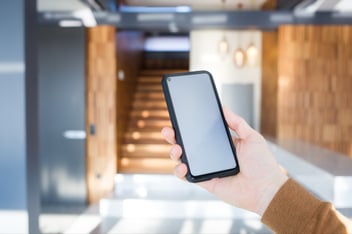
A surprising fact: most mobile calls happen indoors. The problem is that modern office buildings and heritage structures weren’t designed with wireless signals in mind.
Business operations suffer when concrete walls block reception or when dead spots show up in stairwells, carparks, and lifts. Thick building materials like concrete, steel, and energy-efficient glass can stop your mobile signal from reaching the spaces where your team works. In larger venues, the issue is usually worse, with patchy coverage in some areas and complete blackouts in others.
The good news is that there are practical ways to fix it. In some sites, a signal booster can improve coverage across key areas. In more complex buildings, a Distributed Antenna System (DAS) can capture and distribute a mobile signal throughout the premises. In the right environment, businesses can eliminate repeat dead zones and achieve reliable mobile coverage across their premises.
This article will walk through what causes a poor mobile signal at work and how to choose a solution that makes sense for your building, your team, and your compliance obligations in Australia.
Common Causes of a Poor Mobile Signal in Business Spaces
You need to know why your workplace has poor reception before you can fix it. Most indoor signal problems stem from a few predictable causes.
Building materials that block signal strength
Commercial buildings often use materials that reduce or reflect radio frequency signals.
Common culprits include:
- Reinforced concrete and steel
- Metal roofing and façades
- Energy-efficient (Low-E) glass
- Foil-backed insulation and dense internal layouts
It’s also common to have a reasonable signal outside, but poor reception once you step inside. The signal weakens as it travels through layers of material, and some buildings create a “shielded” effect that makes indoor coverage unreliable.
If this sounds familiar, it’s often worth reviewing how your mobile signal behaves inside your building.
See how Xylem improved mobile coverage inside a large warehouse
Xylem Case Study
Distance from the nearest tower
Signal strength drops as you move further from a tower. That matters most in industrial areas, edge-of-suburb sites, or regional locations, where an outdoor signal may already be weak before it hits the building.
Obstructions and interference inside the building
Dead zones aren’t random. Certain areas tend to perform worse, including:
- Meeting rooms and internal offices
- Lift cores and stairwells
- Basements and underground car parks
- Long internal corridors
High concentrations of metal, plant rooms, and some equipment can also contribute to poor performance.
Network congestion during peak hours
You can have “full bars” and still have poor real-world performance. During peak business hours, networks can become congested, particularly in the CBD, high-density precincts, or major venues. Calls may drop, or data speeds may fall sharply (even when the signal indicator looks fine).
How Mobile Signal Boosters Work
Mobile signal boosters work in a straightforward way. They capture a weak cellular signal, amplify it, and rebroadcast it inside your building.
They don’t create a new signal; they make an existing signal usable.
Key components
Most systems include:
- Outside antenna (donor antenna): mounted on a roof or exterior wall to capture an available signal
- Booster / amplifier unit: strengthens and manages the signal
- Inside antenna(s): distributes the improved signal through the workplace
How the signal is captured and amplified
The external antenna picks up whatever signal is available, the amplifier strengthens it, and internal antennas broadcast it into the areas where coverage is currently unreliable.
In the right setup, this improves both incoming and outgoing performance (clearer calls, fewer dropouts, and more stable data).
Choosing the Right Solution for Your Business
The best solution depends on building size, layout, construction materials, and how mobile connectivity is used day-to-day.
When a signal booster is enough
Signal boosters are often a good fit when:
- The building has some usable signal outside
- The site is small to mid-sized
- You mainly need to improve coverage in key work areas rather than across a massive footprint
When to use a DAS
ADAS is typically the better choice when:
- The site is large, multi-level, or structurally complex
- You need consistent coverage across many zones (not just one or two problem areas)
- Coverage needs to be reliable for operations or safety reasons
DAS solutions are common in hospitals, universities, towers, major venues, and industrial sites where dead zones are predictable and recurring.
Universal vs carrier-specific solutions
Carrier compatibility matters in Australia. Some systems are designed to work with one carrier, while others support broader requirements. Either way, the approach needs to align with carrier expectations to avoid interference and compliance issues.
Legal and Carrier Compatibility in Australia
In Australia, signal boosting equipment is regulated, and carrier alignment matters.
You generally need carrier approval/authorisation for signal boosting deployments. Non-compliant equipment or poor installations can cause interference and may expose a business to penalties.
This is why the best results come from a solution that’s designed around:
- The signal availability outside the building
- The building’s layout and materials
- Carrier requirements and regulatory obligations
Installation: DIY vs Professional Setup
Some small-office setups can be installed successfully with the right equipment and planning, but most business environments benefit from a professional design approach.
Professional deployments typically include:
- A site survey and signal testing
- Coverage mapping (to identify repeatable dead zones)
- Antenna placement based on layout and materials
- A design that meets carrier and regulatory requirements
The Bottom Line
If your workplace has repeatable dead zones, dropped calls, or inconsistent data, it’s usually not a handset problem. It’s the building and the indoor coverage environment.
Signal boosters can work well in smaller sites with a usable outdoor signal. Larger or more complex buildings often need a DAS to deliver consistent coverage where teams actually move and work.
This is where our team at MobileCorp can help.
MobileCorp designs and delivers in-building mobile coverage solutions that reduce dead zones, improve call reliability, and support consistent voice and data performance across offices, industrial sites, retail venues, and large commercial facilities.
Improve In-Building Mobile Coverage
FAQs
Why do I have full signal bars but poor call quality indoors?
Signal bars are a rough indicator of mobile signal strength, not a guarantee of clear voice quality. In some buildings, mobile reception drops in and out as signals pass through concrete, steel, or Low-E glass, which can lead to choppy audio or dropped calls even when signal bars look fine.
Does being close to a cell tower guarantee good mobile reception inside a building?
Not always. Even with strong network coverage outside, building materials and layout can block or reflect the signal, reducing indoor mobile signal strength and creating repeat dead zones.
What’s the difference between a mobile phone signal booster and a cellular repeater?
“Mobile Phone Signal Boosters” and “Cellular Repeaters” are often used to describe the same type of solution: equipment that captures an existing cell phone signal, amplifies it, and redistributes it inside a building. The right setup depends on the coverage area you need to improve and what signal is available outside.
Can a 4/5G booster improve both calls and mobile data?
Yes, when designed properly. A 4/5G booster can strengthen a usable signal for voice and data, which can improve reliability for calls and day-to-day connectivity in weak zones. Results depend on the quality of the signal being captured and how the indoor antenna coverage is planned.
Do signal boosters improve 5G connectivity and 5G coverage?
Sometimes. It depends on the 5G coverage in your area, the frequency bands in use, and the solution you deploy. Some systems can support certain 5G connectivity bands, while others primarily improve 4G performance, which can still make a noticeable difference indoors. Through a site audit, MobileCorp can recommend the right signal booster for your needs.
How do you work out the right coverage area and indoor antenna placement?
Indoor antenna placement should be based on where people work and where dead zones consistently happen, not guesswork. The goal is to maximise coverage across the areas that matter most (like offices, loading zones, meeting rooms, stairwells, or basements) while maintaining stable performance.
Will a signal booster help with remote work and hybrid teams in the office?
It can. If staff rely on mobile calls, hotspotting, or consistent mobile data for remote work days in the office, improving network coverage indoors can reduce dropouts and help teams stay reachable.
5G Lorin McDowell 22 Jan 2026
Related Posts



Popular Tags
- Mobile Devices (80)
- Mobility (80)
- 5G (67)
- Telstra (64)
- MobileCorp Managed Services (53)
- Mobile Network (38)
- Networks (32)
- Cradlepoint (31)
- Apple (28)
- MobileCorp (28)
- iPhone (24)
- Remote Working (22)
- Network (18)
- Mobile Security (15)
- Wireless WAN (15)
- Covid-19 (14)
- UEM (14)
- Cyber Security (12)
- MDM (11)
- Mobile Expense Management (10)
- TEMs (9)
- Mobile Device Lifecycle (8)
- Mobile Device Management (8)
- Cloud (7)
- Unified Comms (7)
- Unified Communications (7)
- Wandera (7)
- Android (6)
- Sustainability (6)
- Data Networks (5)
- Network Security (5)
- Samsung (5)
- Security (5)
- Digital Experience (4)
- IOT (4)
- Microsoft Intune (4)
- Blog (3)
- Data (3)
- IT Services (3)
- Microsoft (3)
- DAS (2)
- Microsoft 365 & Teams (2)
- Retail (2)
- nbn (2)
- webinar (2)
- 4G (1)
- Distributed Antenna System (1)
- EMM (1)
- Emerging Technologies (1)
- Government (1)
- Hosted Telephony (1)
- In-Building Coverage (1)
- Managed Desktops (1)
- Nextivity (1)
- SD-WAN (1)
- Starlink (1)
- Telstra Services (1)
- WWAN (1)
- video (1)